


Estimated reading time: 9 minutes
When the display goes dark, your HVAC system stops receiving operational signals, leaving your living space vulnerable to uncomfortable temperature swings.
A blank thermostat screen does not automatically mean you need to purchase an expensive replacement device. The issue can stem from something as simple as dead alkaline batteries or a loose faceplate, or it can point to a safety shutoff triggered deep inside your furnace or air handler.
In this comprehensive troubleshooting guide, we will break down the primary reasons why a thermostat screen goes blank, provide an actionable step-by-step diagnostic checklist, and explain when to call for certified HVAC service.
How Your Thermostat Receives Power
To diagnose why your thermostat display has turned off, it helps to understand how modern thermostats are powered. Generally, thermostats fall into three electrical categories:
- Battery-Powered Thermostats: Basic digital thermostats run entirely on internal AA or AAA alkaline batteries. The batteries power both the liquid crystal display and the low-voltage internal relays that command your furnace and air conditioner.
- Hardwired 24-Volt Thermostats: Many systems draw continuous 24-volt alternating current power directly from a step-down transformer inside your indoor furnace or air handler through a dedicated common wire, frequently referred to as the C-wire.
- Hybrid Thermostats: Many programmable and smart thermostats use 24-volt power from the HVAC equipment to operate Wi-Fi radios and backlights, while utilizing internal batteries or lithium capacitors as a backup to preserve system memory during electrical outages.
Knowing whether your unit relies on disposable batteries, equipment power, or a combination of both will quickly narrow down the root cause of a blank screen.
6 Reasons Your Thermostat Screen Is Blank
When a thermostat screen suddenly goes dark, technicians check several universal failure points spanning internal batteries, electrical breakers, and HVAC safety mechanisms. Here are six primary causes behind a blank thermostat screen.
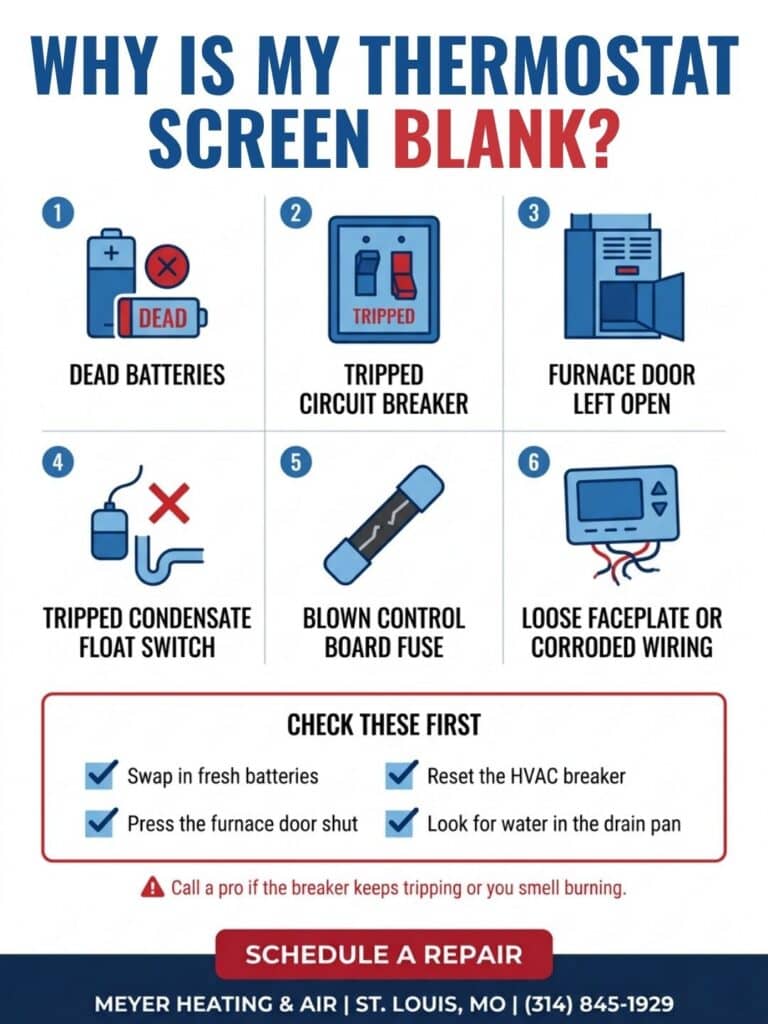
1. Dead or Depleted Batteries
The most frequent culprit behind a blank digital thermostat is simply dead batteries. Many digital units do not feature an audible warning when battery levels drop; they may display a faint low-battery icon for several days before the screen cuts out entirely.
When the batteries lose enough voltage, the screen shuts off and the thermostat loses the power needed to close the internal relays that signal your heating and cooling equipment to start.
2. Tripped Circuit Breakers in the Main Electrical Panel
If your thermostat draws power from your home electrical grid via a low-voltage transformer, any disruption in electrical current will shut off the display.
Power surges, lightning strikes during summer storms, or overloaded household circuits can trip the breaker supplying electricity to your indoor heating and cooling equipment. If the breaker marked Furnace, Air Handler, or HVAC flips to the OFF or neutral position, the transformer loses power, immediately cutting electrical current to the thermostat C-wire.
3. Open Furnace or Air Handler Blower Door Safety Switch
Every modern furnace and indoor air handler features a built-in safety interlock switch mounted on the cabinet frame. This push-button switch is designed to cut all electrical power to the unit whenever the blower compartment access panel is removed, protecting homeowners and technicians from moving fan blades and live electrical circuits.
If you recently inspected or changed your air filter and did not reseat the furnace door completely flush against the metal chassis, the safety switch will remain open. This breaks the 24-volt power circuit and leaves your thermostat screen blank.
4. Tripped Condensate Overflow Float Switch
During the humid summer cooling season or winter operation of a high-efficiency condensing gas furnace, your system produces gallons of liquid condensation. This moisture drains away through an internal plastic trap and an exterior PVC drain line.
If algae, dust, or mold clogs this drain line, water backs up into the drain pan. Modern HVAC installations feature an automated condensate float switch wired into the low-voltage circuit. As soon as standing water lifts the float, the switch cuts power to the entire system to prevent water from overflowing onto ceilings or floors. This automated safety shutdown immediately turns off the 24-volt power supply to your wall thermostat.
5. Blown Low-Voltage Transformer Fuse on the Control Board
Inside your furnace or air handler cabinet sits a printed circuit control board that manages system operations. Mounted directly onto this board is a small automotive-style blade fuse, typically rated at 3 or 5 amps.
This fuse protects the sensitive step-down transformer and electronic controls from low-voltage electrical shorts. If thermostat wires touch behind the wall, if an outdoor contactor coil shorts out, or if an electrical surge passes through the system, this fuse will pop. Once blown, all 24-volt current ceases, causing the thermostat screen to turn off.
6. Loose Faceplate Connections or Wiring Corrosion
Thermostats consist of two main components: a backplate screwed directly to your drywall where the colored copper wires connect, and a detachable front display faceplate containing the electronics.
Over time, daily vibrations or accidental bumps can loosen the front faceplate from the backplate terminal pins. If the metal contact pins fail to seat firmly into their slots, electrical connectivity is severed. Furthermore, stripped wire ends can loosen from screw terminals, or corrosion can develop on older copper conductors, interrupting power delivery.
Step-by-Step Troubleshooting Checklist for Homeowners
Before calling for emergency HVAC service, you can run through several straightforward diagnostic checks to see if your thermostat screen can be easily restored:
Step 1: Inspect and Replace the Batteries
Gently grip the sides of your thermostat housing and pull it forward off its wall mounting plate, or slide open the dedicated battery compartment drawer. Remove the old batteries and inspect the metal contact terminals for white corrosion or acid leaks. Clean the terminals with a dry cloth and insert a fresh pair of high-quality AA or AAA alkaline batteries, paying close attention to polarity markings.
Step 2: Check the Electrical Circuit Breakers
Locate your home main electrical service panel and find the breakers labeled Furnace, AC, or Air Handler. Look for any breaker switch sitting in the OFF position or resting in the middle tripped position. Firmly push the switch completely to the OFF position first, then flip it back to ON to reset the circuit.
Step 3: Verify the Furnace Cabinet Door Is Closed
Walk to your indoor heating unit and check the front access panels covering the blower motor and filter slot. Press firmly along the edges of the cabinet door to ensure it is seated snugly into its retaining track and that the safety interlock button is fully depressed.
Step 4: Check the Condensate Drain Pan and Float Switch
Inspect the PVC drain line and auxiliary drain pan beneath your indoor air handler or condensing furnace. If you see standing water pooling in the pan, or if the small plastic float switch sitting in the drain line has popped upward, your system has suffered an active drainage clog that must be cleared to restore electrical power.
Step 5: Check Faceplate Alignment and Mounting Pins
Carefully align the thermostat faceplate with the wall backplate and press firmly until you hear or feel a definitive click. Ensure the terminal pins on the back of the circuit board are straight and free of dust or bent prongs.
When to Call a Professional HVAC Technician
If you have replaced the batteries, reset the breakers, and confirmed the furnace access panel is shut, a blank screen indicates an underlying electrical failure within your HVAC equipment. Continuing to troubleshoot live electrical panels without proper diagnostic tools carries serious safety risks.
You should contact a certified technician if you encounter:
- A Repeatedly Tripping Breaker: If resetting the HVAC breaker causes it to trip again immediately, a dangerous short circuit or failing motor winding is present.
- A Blown Control Board Fuse: Replacing a blown 3-amp or 5-amp fuse without diagnosing the underlying electrical short will simply cause the new fuse to blow the moment the system calls for heat or air conditioning.
- Burn Marks or Melted Insulation: Any visible scorching, melted wire insulation, or burning electrical odors behind the thermostat or inside the furnace cabinet requires immediate professional intervention.
- Stubborn Condensate Blockages: If standing water has triggered the safety float switch, a technician uses specialized high-pressure vacuum tools to clear compacted algae and sludge from the drainage traps, ensuring water flows freely outdoors.
Restore Your Home Comfort with Meyer Heating and Air
At Meyer Heating and Air, our certified technicians bring decades of hands-on technical craftsmanship to every residential comfort challenge. We specialize in comprehensive thermostat repair and electrical diagnostics, as well as modern smart thermostat installation to upgrade your central control system.
If your thermostat screen has gone blank and your heating or cooling system refuses to start, our local team provides dependable hvac repairs in Arnold and prompt, comprehensive heating and cooling services in Fenton. We arrive quickly, test your low-voltage circuits, identify the root cause of the power loss, and deliver lasting repairs that get your comfort system back up and running.
Contact Meyer Heating and Air today to schedule your thermostat diagnostic or installation appointment and restore reliable climate control to your home!
Frequently Asked Questions
Can dead batteries in a thermostat stop an AC or furnace from running?
Yes. When the batteries in a battery-powered thermostat die, the unit loses the electrical power required to close the low-voltage switches that send start signals to your air conditioner or furnace. Until fresh batteries are installed, the HVAC equipment will remain completely unresponsive.
Why is my thermostat screen blank after changing the air filter?
When changing your air filter, you likely opened or removed the front blower access door on your furnace or air handler. Modern units feature a safety door switch that cuts 24-volt electrical power to the system when the panel is opened. If the door was not reinstalled completely flush, the switch remains open, leaving your thermostat without power.
Does a tripped float switch make a thermostat screen go blank?
Yes, on systems where the thermostat receives power via a 24-volt C-wire. Many HVAC installers wire the condensate overflow float switch directly into the low-voltage power supply. If water backs up in your drain pan, the switch trips and cuts power to the entire low-voltage control circuit, causing the thermostat screen to turn off.
How do I know if my thermostat itself is broken?
If you have inserted brand-new batteries, confirmed 24 volts of power at the wall terminals using a multimeter, verified that all equipment switches are closed, and the display still refuses to illuminate or register touch commands, the internal processor or liquid crystal display has failed and the thermostat must be replaced.